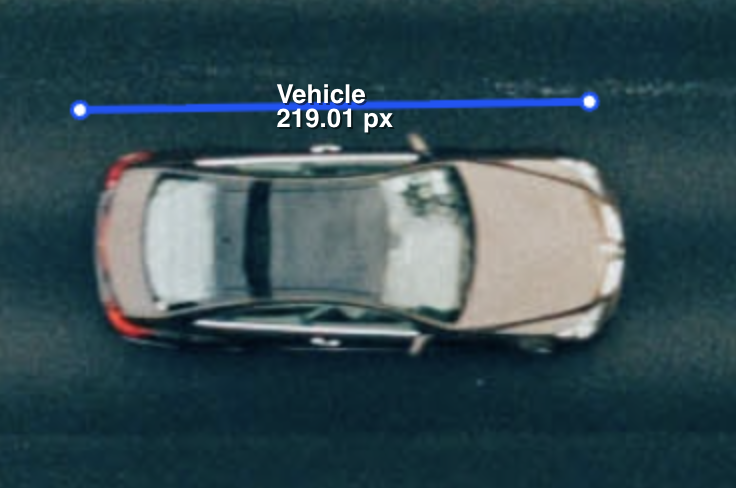
Two-point polylines now show their length in pixels on images and videos, updating as you drag an endpoint. Hold Alt while drawing or editing a polyline to snap segments to 15-degree increments.
Improved video editor responsiveness when working with large numbers of objects and keyframes. A loading indicator now shows when saved annotations are being downloaded and the timeline is being prepared.
Video objects can now be marked in or out of view one frame at a time with W. Use Q and E to mark ranges. Out-of-view actions
Frame-specific video classifications now support out-of-view ranges. Answers remain visible but read-only on those frames, and full-frame exports omit them. Frame-specific classifications
Upload boxes now show uploading and file-ready states inside the box, with clearer instructions for immediately uploading or replacing a file.
The Dashboard now includes a Duration by Stage widget, showing total recorded time and average time per completed stage pass. Time per Task also includes custom Complete stages.
The Burndown Chart now takes up half the Dashboard width on desktop, leaving room for other widgets alongside it.
The 3D Medical editor now offers 1x3 and 1+3 view layouts. Show three views side by side, or one full-width view above three smaller views. Your layout and view choices are remembered within each project.
You can now press T to toggle Level Tracing in the 3D Medical editor when a labeling tool is selected.
Crosshair lines in the Medical labeling editor now show directional arrows when hovered over or dragged, making their direction of movement clearer.
Magnetic Lasso is now disabled when no enabled Polygon or Segmentation tool is available in the category schema. Hovering over the button explains what is required.